
EIGHTTRACK AUDIO / JOURNAL
Introducing Eighttrack Console
Record, edit, and mix in a focused eight-track workspace for Windows. Discover the workflow, core tools, and demo.
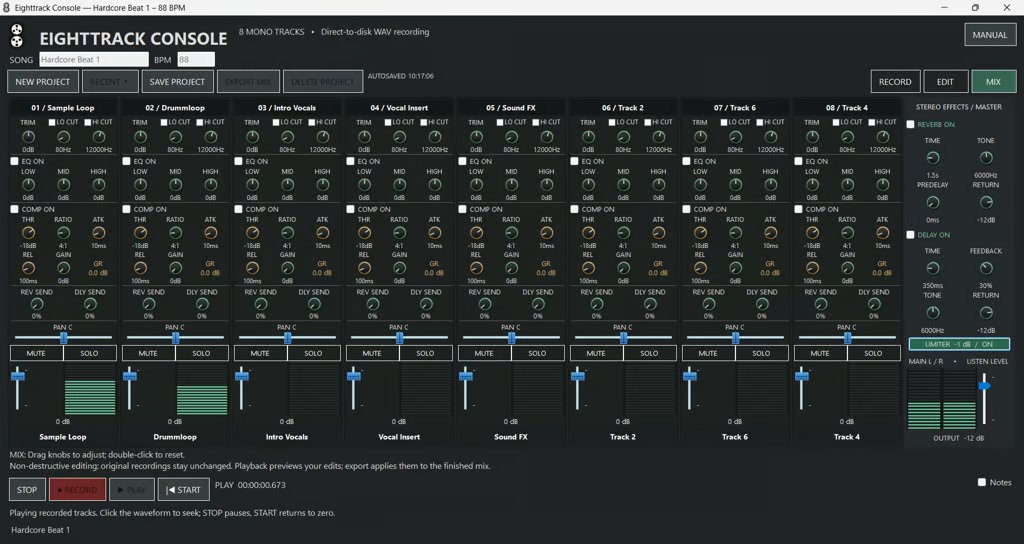
A good idea deserves a place to become a track. Eighttrack Console is an eight-track recorder, editor, and mixer for Windows, built around three clear views: Record, Edit, and Mix. Capture a performance, arrange the takes, and bring the parts together without losing sight of the music.
Record the take
Work with eight mono audio tracks for instruments, vocals, and external audio. Select your ASIO interface, inputs, outputs, sample rate, and buffer size, then arm individual tracks or all eight with Quick Arm. Overdub new parts while existing tracks play, or use Punch In and Punch Out markers to replace a specific section on armed tracks. A recording metronome and adjustable Wait for Audio threshold help you prepare for the next take.
Shape the edit
Move, split, trim, copy, duplicate, and fade clips with non-destructive editing that preserves your original recordings. Import WAV audio into empty track lanes, use named markers and playback loops to navigate, and zoom into the arrangement when details matter. Undo, Redo, and Reset Edits give you room to revise.
Build the mix
Each channel combines trim, low-cut and high-cut filters, three-band EQ, compression, pan, and a fader. Mute, solo, and meters help you focus on individual parts. Channel sends feed shared reverb and delay, while stereo output meters, output level, and an optional limiter support the final mix. The Full Version exports finished stereo audio as WAV or MP3.
Keep the session together
Self-contained .8track projects store your audio, edits, markers, and mixer settings together. Rename and rearrange tracks, add notes, use Save As for separate versions, and reopen recent projects. The included PDF manual covers instructions and keyboard shortcuts. Choose Modern Digital or the optional Vintage Skin: the skin changes the appearance only, not the workflow or operation.
Try it before you buy
The Demo lets you record, edit, mix, and save normal .8track projects. Open those projects in the Full Version to continue working and export. Audio export is disabled in the Demo. The Full Version is $29.99 USD as a one-time purchase.
Before you begin
Eighttrack Console requires 64-bit Windows 10 or later and an audio interface with a manufacturer-supplied 64-bit ASIO driver for recording and playback. Visit the Eighttrack Console page for the demo, product details, and purchase options.